PSQL debugging help
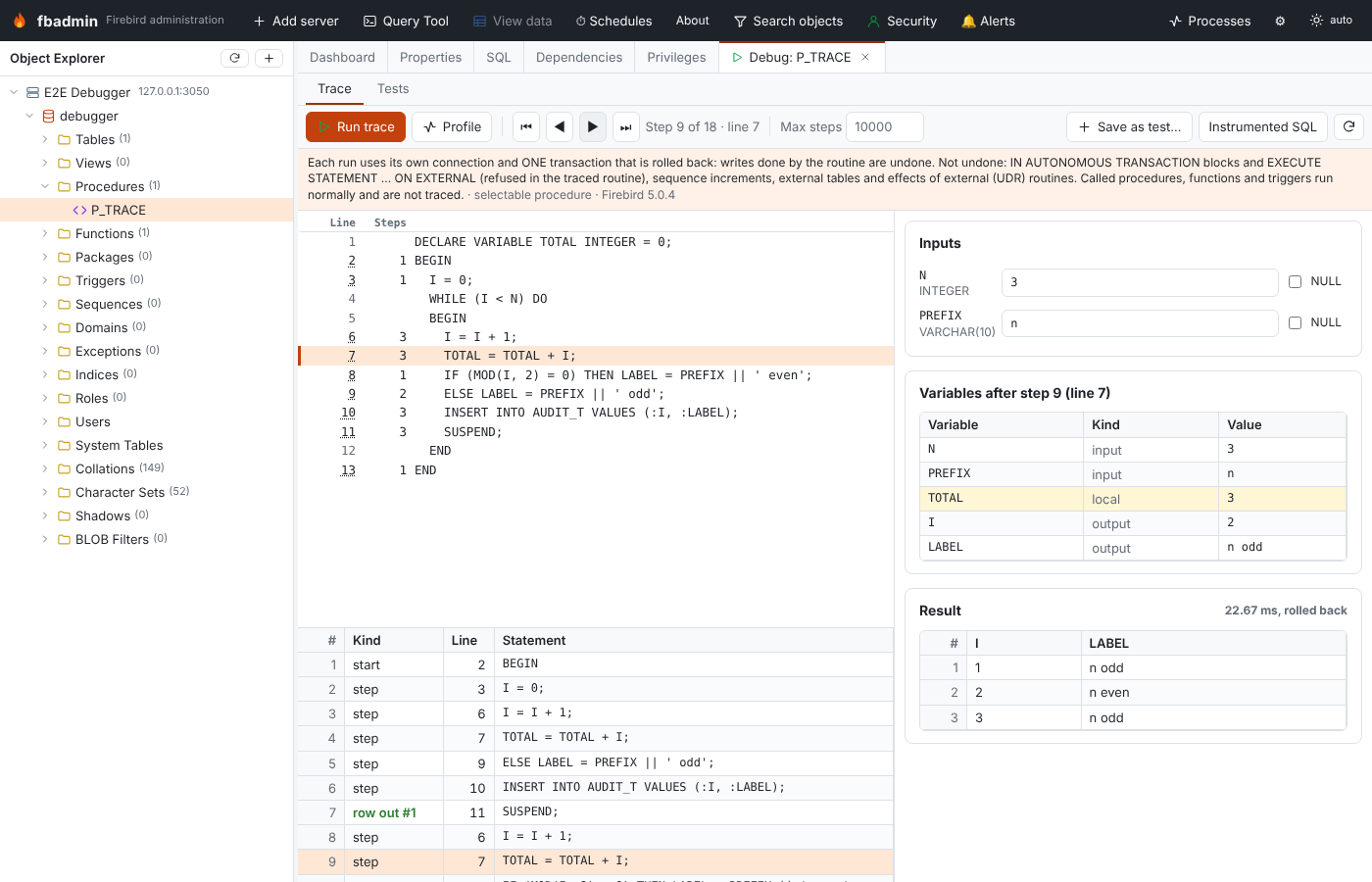
Milestone 1.2. Firebird has no debugger API: you cannot pause a procedure, look at its variables and step to the next line. fbadmin gets as close as it honestly can with three tools on one screen:
- Trace — runs an instrumented copy of a procedure, function or
EXECUTE BLOCKthat records the line and the variables after every statement. You then step back and forward through the recorded steps like in a debugger (it is a replay, not a live session). - Profile — runs the routine itself under the Firebird 5 profiler and shows hit counts and time per source line.
- Tests — saved test cases per routine (inputs plus the expected rows or error), run one by one or all at once, each in a transaction that is rolled back.
Open it from the context menu of a procedure or function (Debug / trace…, Tests…) or of a database (Debug EXECUTE BLOCK…, PSQL tests…).
Nothing is committed
Every run (trace, profile, test) uses its own connection and one transaction that is rolled back at the end. Inserts, updates, deletes and DDL done by the routine (or by the procedures, functions and triggers it calls) are undone.
A run that takes too long (a trace, a profiled run or a test run) can be stopped with Cancel: its running statement is cancelled from a second attachment (like the Query Tool's Cancel button) and the transaction is rolled back. Results of a test run that was cancelled are not recorded.
A rollback cannot undo everything:
| Effect | What fbadmin does |
|---|---|
IN AUTONOMOUS TRANSACTION DO ... in the traced routine |
refused: the routine cannot be traced |
EXECUTE STATEMENT ... ON EXTERNAL / WITH AUTONOMOUS TRANSACTION in the traced routine |
refused |
| the same in a procedure, function or trigger the routine depends on | warning (found through RDB$DEPENDENCIES) |
sequences (GEN_ID, NEXT VALUE FOR) |
warning: increments are not transactional |
| writes to external tables | warning |
| external (UDR) routines that are called | warning: effects outside the database are not undone |
POST_EVENT |
events are only delivered on commit, so they are never delivered |
On a server registered as read-only the trace, profile and test endpoints (all POST) are
refused by fbadmin's read-only guard, like every other request that is not a plain query; the
source and the saved tests can still be viewed.
Trace runs
Pick the input values (text, or tick NULL) and press Run trace. Values are passed as
string literals and converted by Firebird, exactly as SELECT * FROM P('5', '2024-01-31') would.
The screen shows:
- Source with line numbers. Steps is how many recorded steps are on that line; the current step's line is highlighted, an error line is red. Click an underlined line number to jump to the next step on that line ("run to line").
- Step controls: first / back / forward / last, and Max steps (default 10 000, at most 100 000). A run that records more steps is stopped there, so an endless loop does not hang.
- Variables after the current step: inputs, local variables, output parameters (and a function's result). Values that changed in this step are highlighted. BLOBs are shown as their size, long strings are cut (see below).
- Steps: every recorded step (kind, line, statement). The list is keyboard operable (arrow keys, Page Up/Down, Home/End).
- Result: the rows (selectable procedures), the output parameters (executable procedures) or the returned value (functions), or the error.
Step kinds: start (inputs and initial values), step (after a statement; before LEAVE,
BREAK, CONTINUE and EXCEPTION), fetch (a FOR SELECT / FOR EXECUTE STATEMENT loop
fetched a row into its variables), row out (SUSPEND), caught error (a WHEN handler was
entered: shows GDSCODE, SQLSTATE and, on Firebird 4+, the error message), end.
When the routine fails, the error message is shown with At block line: N rewritten as
At source line N, the line is marked, and Show the last step jumps to the last recorded state.
Save as test… turns the inputs and the result of the last trace (rows or error) into a test case.
How it works
fbadmin rewrites the routine into an EXECUTE BLOCK and runs that instead of the routine:
EXECUTE BLOCK RETURNS (FBT$K SMALLINT, FBT$L INTEGER, <the routine's outputs>, FBT$1 <type of input 1>, ...)
AS DECLARE N INTEGER = '3'; <the routine's own declarations, unchanged>
BEGIN BEGIN FBT$K=0;FBT$L=2;FBT$1=N;...;SUSPEND;
  I = 0; FBT$K=1;FBT$L=3;FBT$2=I;SUSPEND;
  WHILE (I < N) DO
  ...
- Input parameters become local variables initialised with the values you typed.
- After every statement a tracing statement sets the step kind, the line in the original source
and the variables the statement mentions (a statement can only change variables it names), then
SUSPENDs that row to fbadmin. Entry, handler and end steps copy every variable. - Single statements in
IF ... THEN,ELSE,WHILE ... DO,FOR ... DOandWHEN ... DOare wrapped inBEGIN ... ENDso the extra statement stays inside the branch:IF (x) THEN stmt;becomesIF (x) THEN BEGIN stmt; <trace> END. SUSPENDemits the output row,EXITand a function'sRETURN expremit the final row first (RETURN exprbecomesFBT$R = expr; <final row> EXIT;).- Statements are never removed or reordered, and every insertion stays on the line of its statement, so line numbers in the block are the line numbers of the routine's stored source.
- On Firebird 4 and newer the body is wrapped in a
WHEN ANYhandler that turns an escaping error into a last row (withRDB$ERROR(MESSAGE)), so rows can be fetched in batches. Firebird 3 has noRDB$ERROR: there fbadmin fetches one row per round trip so the steps before the error are not lost (slower: roughly 1 ms per step).
The trace is collected as result rows, not in context variables, so there is no 1000-variable
(RDB$SET_CONTEXT) or 255-character limit; the cap is Max steps.
Use Instrumented SQL to see exactly what was run.
What is and isn't supported
Supported: procedures (selectable and executable), functions and anonymous EXECUTE BLOCKs
(their = ? inputs are filled from the inputs form); nested BEGIN ... END; IF/ELSE chains with
or without BEGIN; WHILE; labels with LEAVE/CONTINUE/BREAK; FOR SELECT ... INTO ... DO
(also AS CURSOR with WHERE CURRENT OF); FOR EXECUTE STATEMENT ... DO; DECLARE ... CURSOR
with OPEN/FETCH/CLOSE; sub-procedures and sub-functions (Firebird 3+); WHEN ... DO handlers
(any condition list), EXCEPTION with and without re-raise; SUSPEND, EXIT, RETURN; CASE
expressions; MERGE; ROW_COUNT, GDSCODE, SQLSTATE (tracing statements do not reset them);
comments, 'strings', q'{...}' strings and "quoted" names containing keywords and semicolons.
Not traced (they run normally): sub-procedure and sub-function bodies, called procedures and
functions, triggers fired by the routine's DML, dynamic SQL of EXECUTE STATEMENT, and fields of
AS CURSOR cursors (only variables are shown).
Not supported: triggers and packaged routines (use a test or the profiler on a caller), legacy
UDFs, external (UDR) routines (no PSQL to trace — they can still be tested), and IN AUTONOMOUS
TRANSACTION / ON EXTERNAL in the traced routine. Source the parser does not understand is
refused with the line and the reason rather than guessed.
Differences from running the routine itself:
- The block runs with your privileges. A routine with
SQL SECURITY DEFINER(or one that was granted privileges the caller lacks) may behave differently; tests and profiled runs call the routine itself and are not affected. NOT NULLand domainCHECKconstraints of output parameters are not enforced in a trace (trace rows are sent before the outputs are set). Input parameters and local variables keep their constraints. The screen warns when this applies.- Every trace row is a round trip to fbadmin, so a trace is much slower than the routine itself. Use Profile for timings.
- Very long strings (over 4000 bytes) are traced as their first 1000 characters and BLOBs as their size, so one trace row stays below Firebird's 64 KB message limit. On Firebird 3 an instrumented block over 64 KB is refused.
Per-line timings (Firebird 5)
Profile calls the routine itself (SELECT * FROM P(...), EXECUTE PROCEDURE P(...) or
SELECT F(...) FROM RDB$DATABASE) between RDB$PROFILER.START_SESSION and
FINISH_SESSION(TRUE), rolls the call back, and shows Count and Time columns next to the
source, with the hottest lines marked. Profiler line numbers are relative to the CREATE
statement; fbadmin maps them to the stored source (the same mapping as the Profiler screen).
The profile also stays available under Monitoring → Profiler.
On Firebird 3 and 4 the button explains that per-line timings need Firebird 5.
Tests
The Tests view lists the test cases of the routine (or, from the database menu, of the whole database). A test case has a name, input values and the expected outcome:
- Rows — a JSON list of rows, each a list of values:
[[1, "a"], [2, null]]. A function returns one row with its result ([[120]]), an executable procedure one row of output parameters. Values are compared as text after trimming trailing blanks (soCHARpadding does not matter), numbers numerically ("3.50"equals3.5) and timestamps with or without theT. - An error — the error message must contain the given text (empty: any error).
Run tests of P, Run all tests of this database and the ▷ button of a row call the routine
itself (not the instrumented copy), one transaction per test, rolled back. Failures list the
differences (row 1, LABEL: expected 'x even', got 'x odd').
Test cases are stored by fbadmin in psql_tests.json in its data directory (~/.fbadmin or
FBADMIN_DATA_DIR, file mode 0600), per registered database, not in the database itself.
API
All under /api/servers/{server_id}/databases/{db_id}/debug:
| Method and path | What it does |
|---|---|
GET /routine?otype=procedures&name=P |
parameters, source, kind, traceable or why not, warnings |
POST /parse {sql} |
the same for an EXECUTE BLOCK |
POST /trace {otype, name or sql, inputs, watch?, max_steps?} |
trace run |
POST /run |
call the routine itself (rolled back) |
POST /profile |
profiled call (Firebird 5) |
GET/POST /tests, PUT/DELETE /tests/{id} |
test cases |
POST /tests/run {ids?, otype?, routine?} |
run tests; returns pass/fail and differences |
POST /cancel {run_id} |
cancel the trace, run, profile or test run started with this run_id (an optional field of the requests above, chosen by the client); that request then answers 409 with code: "cancelled" |
watch limits the traced variables (all by default), which keeps the block small.