Replication and high availability
Milestone 0.8. Firebird 4.0 introduced built-in logical replication: the primary records changes
of published tables in journal segments (asynchronous) or sends them straight to replicas
(synchronous); a replica database in replica mode applies them. fbadmin manages the parts that
are reachable over SQL and the services API and helps write replication.conf, which lives on
the server.
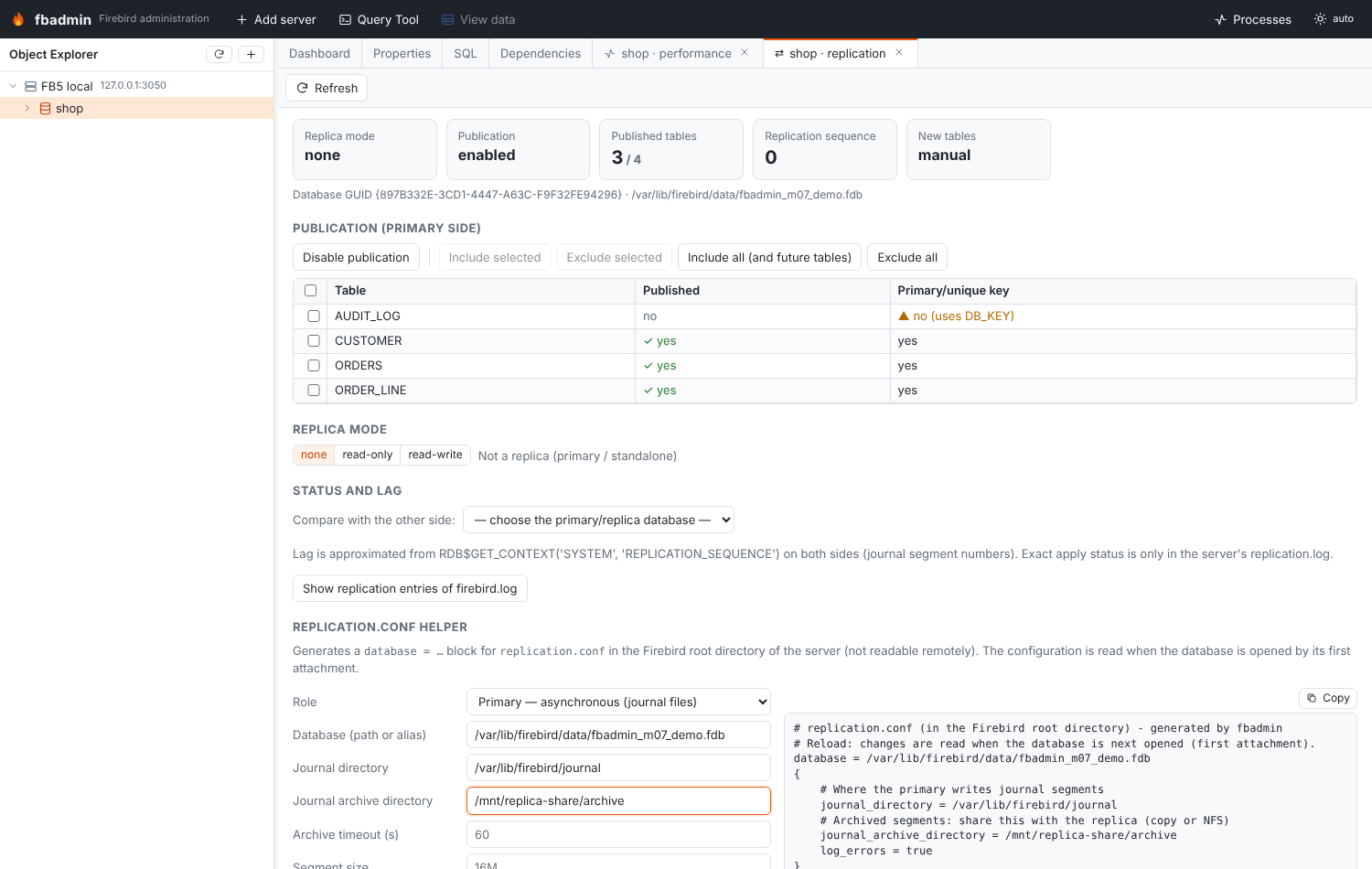
Open Replication from a database's context menu. On Firebird 3 the tab says replication is not
available (the replication.conf helper still works for planning).
Publication (primary)
| Action | SQL |
|---|---|
| Enable / disable publication | ALTER DATABASE ENABLE PUBLICATION / ALTER DATABASE DISABLE PUBLICATION |
| Include tables | ALTER DATABASE INCLUDE TABLE A, B TO PUBLICATION |
| Exclude tables | ALTER DATABASE EXCLUDE TABLE A FROM PUBLICATION |
| Include all (also tables created later) | ALTER DATABASE INCLUDE ALL TO PUBLICATION |
| Exclude all | ALTER DATABASE EXCLUDE ALL FROM PUBLICATION |
The tab lists RDB$PUBLICATIONS (the default publication RDB$DEFAULT: active flag and
auto-enable, which is set by INCLUDE ALL) and all user tables with their published state from
RDB$PUBLICATION_TABLES. Warnings:
- publication enabled but no table included (nothing is replicated);
- published tables without a primary or unique key: they are replicated by
RDB$DB_KEY, so updates and deletes may not find the row on the replica; - a replica that also publishes (cascading replication).
Replica mode
MON$DATABASE.MON$REPLICA_MODE: none (normal database), read_only (only the replication
applier may write) or read_write.
There is no SQL statement for it; fbadmin uses the services API like gfix -replica <mode>
(isc_action_svc_properties with isc_spb_prp_replica_mode). The engine needs exclusive access:
fbadmin closes its own connections to the database (metadata and Query Tool tabs) first and
refuses, listing them, if other applications are attached.
Status and lag
RDB$GET_CONTEXT('SYSTEM', 'REPLICATION_SEQUENCE'): the current journal segment sequence.- Pick the other side (another registered database, possibly on another server) under Status and lag to compare: fbadmin shows the peer's replica mode, sequence and GUID and the difference of sequences as segments behind — an approximation of the lag.
- Show replication entries of firebird.log: entries mentioning replication/journal/segment
read via the services API (
getLog).
What is not reachable remotely: replication.conf itself, the journal and archive directories,
and replication.log (where the replica's applier writes its progress and errors). Firebird does
not expose replication settings through RDB$CONFIG. Monitor those on the server (file system,
log shipping), or use fbadmin's history/metrics for the database-level counters.
replication.conf helper
A form that builds the database = … { … } block to paste into replication.conf in the
Firebird root directory. The configuration is read when the database is opened by its first
attachment.
Roles:
- Primary — asynchronous:
journal_directory(required),journal_archive_directory(required; the replica reads archived segments from here, so share it by NFS/copy),journal_file_prefix,journal_segment_size,journal_segment_count,journal_archive_command,journal_archive_timeout,include_filter,exclude_filter; - Primary — synchronous:
sync_replica = user:password@host:/path/replica.fdb; - Replica:
journal_source_directory(required),source_guid,apply_idle_timeout,apply_error_timeout; - common:
verbose_logging,log_errors,report_errors,disable_on_error,cascade_replication.
Example output:
database = /data/main.fdb
{
    # Where the primary writes journal segments
    journal_directory = /var/lib/firebird/journal
    # Archived segments: share this with the replica (copy or NFS)
    journal_archive_directory = /mnt/replica-share/archive
    journal_archive_timeout = 60
    log_errors = true
}
Typical asynchronous setup
- On the primary server add the primary block to
replication.conf. - In fbadmin: Enable publication, then Include all (or selected tables).
- Copy the database to the replica host (
nbackup -s/gbakrestore). - On the replica server add the replica block with
journal_source_directorypointing to where the archived segments arrive. - In fbadmin (connected to the replica): Replica mode → read-only.
- Register both databases in fbadmin and compare them under Status and lag.
API
| Method | Path | |
|---|---|---|
| GET | /api/servers/{sid}/databases/{dbid}/replication?peer_server=&peer_db= |
status (+ peer comparison) |
| POST | …/replication/publication {enabled} |
enable/disable publication |
| POST | …/replication/tables {action: include\|exclude, tables: [...], all} |
publish tables |
| POST | …/replication/replica-mode {mode: none\|read_only\|read_write} |
switch replica mode |
| GET | …/replication/log |
replication entries of firebird.log |
| POST | /api/replication/conf {role, database, …} |
generate a replication.conf block |