Monitoring and performance
Milestone 0.7. Everything here reads the MON$ monitoring tables (or the Firebird 5 profiler
tables) over a normal attachment. Nothing needs to be installed on the server.
Open it from a database's context menu (Performance dashboard, Transactions & OAT, Index advisor, Profiler) or from the Health section of the database dashboard.
Feature matrix
| Feature | Firebird 3 | Firebird 4 | Firebird 5 |
|---|---|---|---|
| Live charts, history, Prometheus metrics | ✓ | ✓ | ✓ |
Table statistics (MON$TABLE_STATS) |
✓ (3.0.x has it) | ✓ | ✓ |
| Long-running transactions, OIT/OAT alerts, OAT holder | ✓ | ✓ | ✓ |
| Lock waits and likely blockers | ✓ | ✓ | ✓ |
Lock manager settings (RDB$CONFIG) |
– | ✓ | ✓ |
Compiled statement cache (MON$COMPILED_STATEMENTS) |
– | – | ✓ |
Profiler (RDB$PROFILER, PLG$PROF_*) |
– | – | ✓ |
| Index advisor | ✓ | ✓ | ✓ (plus the statement cache as a workload) |
Features are detected at runtime (by looking for the system tables or packages), not by version. Where a feature is missing the UI says so instead of failing.
Live dashboard
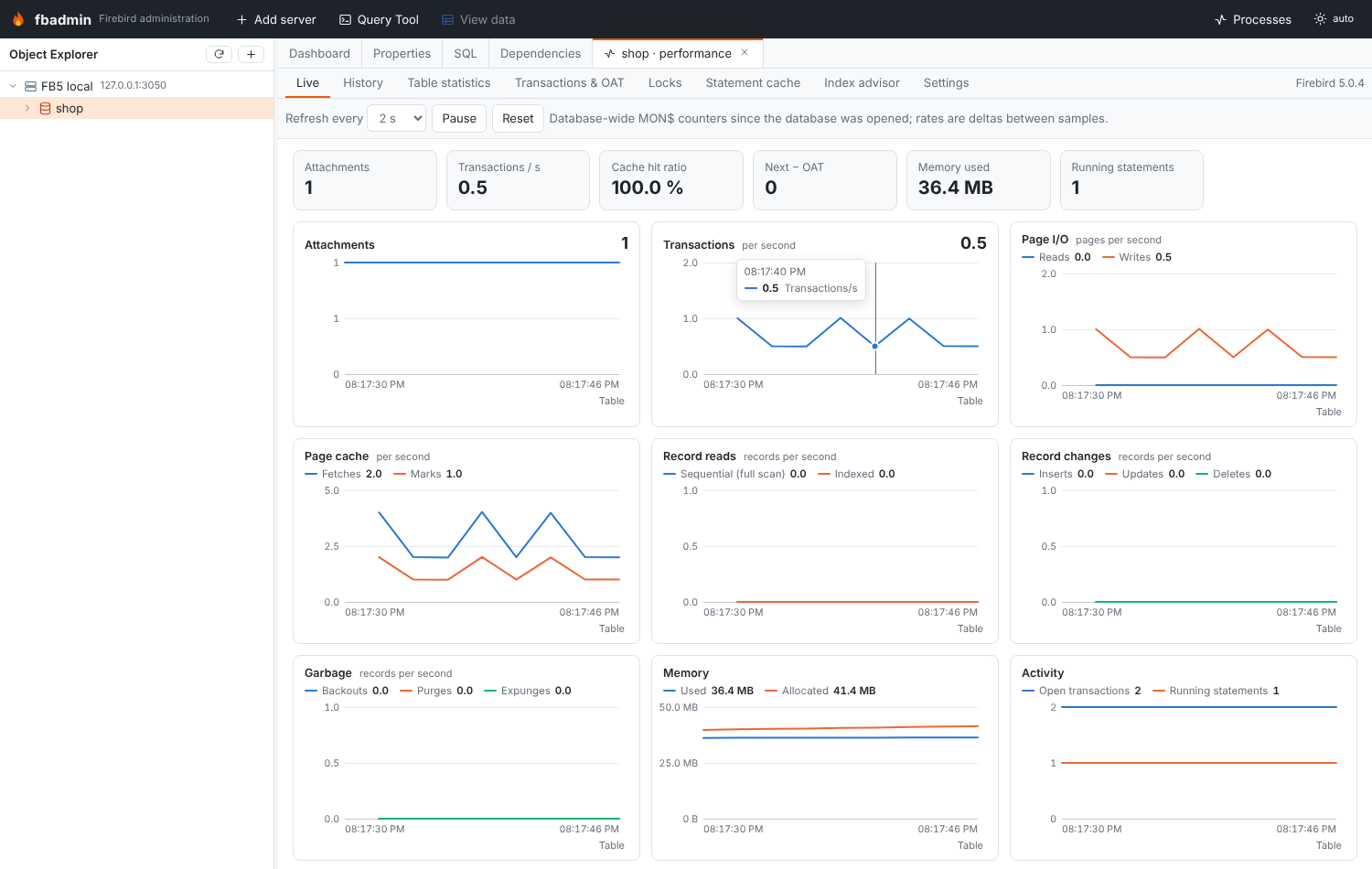
The Live tab polls GET …/monitoring/snapshot (1–30 s) and keeps the last 180 samples in
the browser. A snapshot is one query over MON$DATABASE joined with the database-level
MON$IO_STATS, MON$RECORD_STATS and MON$MEMORY_USAGE, plus counts of attachments,
transactions and running/stalled statements.
Counters are cumulative since the database was opened by its first attachment; the charts show per-second deltas between consecutive samples. If the last attachment disconnects, the counters reset: that interval is shown as a gap.
Charts: attachments, transactions/s (delta of MON$NEXT_TRANSACTION), page reads/writes,
page fetches/marks, sequential vs indexed record reads, inserts/updates/deletes, garbage
(backouts/purges/expunges), memory used/allocated, open transactions and running statements,
next transaction − OAT, and lock contention (record waits and update conflicts). The tiles above
show the latest values and the cache hit ratio (1 − reads/fetches).
The charts are inline SVG (no chart library): one y axis each, a crosshair tooltip that lists
every series, keyboard support (focus a chart, ←/→ move the crosshair) and a Table toggle
that shows the same numbers as a table. Colors are CSS variables in
frontend/src/features/monitoring/monitoring.css with separate light/dark values.
History
Enable Record history for this database in the History tab. A background thread
(started from the FastAPI lifespan) takes a snapshot of every opted-in database every
interval seconds and stores it in monitoring.sqlite in the data directory
(~/.fbadmin or FBADMIN_DATA_DIR). Samples older than the retention are pruned.
Ranges: 1 h, 6 h, 24 h, 3 d, 7 d (down-sampled to 500 points).
While sampling, statements that have been running for longer than slow_seconds are recorded (SQL text, explained plan, longest duration, how often seen). They are listed under the history charts and feed the index advisor.
Settings (Settings sub-tab, or PUT /api/monitoring/settings); environment variables give
the defaults:
| Setting | Env | Default |
|---|---|---|
interval (s, 0 = sampler off) |
FBADMIN_HISTORY_INTERVAL |
60 |
retention_hours |
FBADMIN_HISTORY_RETENTION_HOURS |
168 |
slow_seconds (0 = off) |
FBADMIN_HISTORY_SLOW_SECONDS |
5 |
metrics_enabled |
FBADMIN_METRICS |
off |
Table statistics
Top tables by reads, sequential/indexed reads, inserts, updates, deletes, backouts, purges,
expunges, lock waits, conflicts or back-version reads, from MON$TABLE_STATS (stat group 0,
the whole database). System tables are hidden by default.
Compiled statement cache (Firebird 5)
MON$COMPILED_STATEMENTS: SQL and PSQL routines in the cache with their explained plan, how
many MON$STATEMENTS currently use each one, and their I/O, record and memory counters. Click a
row to see the full SQL and plan.
Transactions, OIT/OAT gaps and who holds the OAT
GET …/monitoring/transactions?long_running=300&gap_warn=10000
- gaps: next − OAT, OAT − OIT, next − OIT, next − OST;
- OAT holder: the transaction whose id equals
MON$OLDEST_ACTIVE(or the oldest transaction that pins it), joined with its attachment (user, address, process, PID) and its statements. "Idle in transaction" is called out when no statement runs in it. You can disconnect the attachment from there; - alerts: next − OAT above the threshold (critical at 10×), OAT − OIT above the threshold (with a sweep hint), and transactions older than long_running seconds. fbadmin's own metadata connection and system attachments (garbage collector, cache writer) are not reported.
The same alerts are shown in the Health section of the database dashboard.
Locks and deadlocks
Firebird has no remote equivalent of fb_lock_print: the lock table lives in shared memory on
the server and is only readable by a local tool. The Locks tab shows what is available
remotely:
- statements waiting for a record lock:
MON$STATEMENTSwithMON$RECORD_WAITS > 0in theirMON$RECORD_STATS, the transaction's lock timeout, and the tables they wait on (per-statementMON$TABLE_STATS); - likely blockers: other live transactions that changed (inserted/updated/deleted/locked)
records of the same tables (per-transaction
MON$TABLE_STATS). Cancel the waiting statement or disconnect the blocker; - statements with update conflicts, all running statements, lock timeouts of transactions;
- lock manager configuration from
RDB$CONFIG(Firebird 4+):DeadlockTimeout,LockMemSize,LockHashSlots,LockAcquireSpins, …
Deadlocks are reported to the losing statement as an error (deadlock / update conflicts with
concurrent update); they are not kept in MON$. For lock-table level analysis run
fb_lock_print -d <database> on the server.
Profiler (Firebird 5)
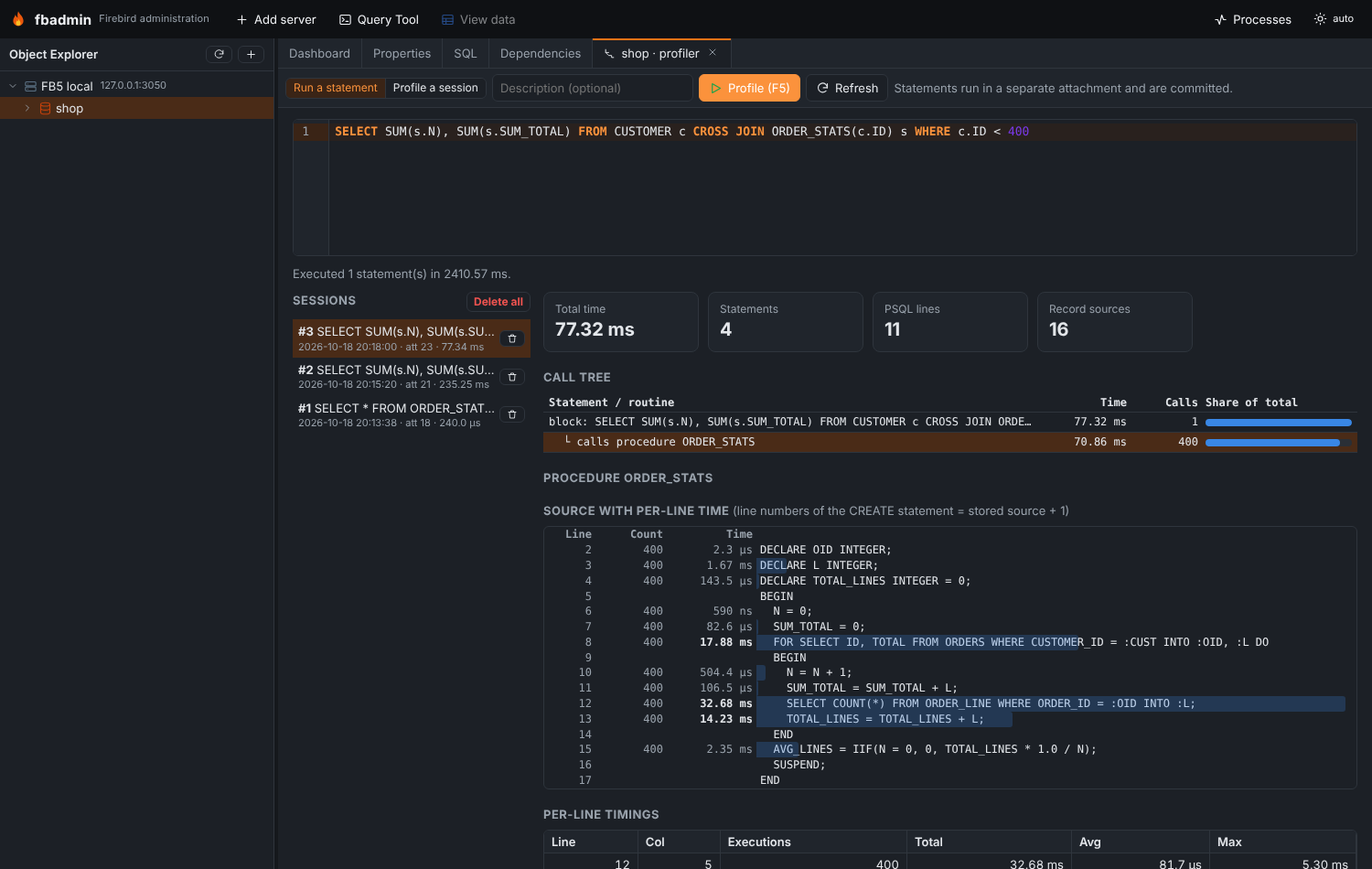
- Run a statement: fbadmin opens a separate attachment, calls
RDB$PROFILER.START_SESSION(description, NULL, NULL, NULL, 'DETAILED_REQUESTS'), runs the statements (fetching all rows), thenRDB$PROFILER.FINISH_SESSION(TRUE)and commits.DETAILED_REQUESTSis needed for per-request timings inPLG$PROF_REQUESTS. - Profile a session: start profiling another attachment — for example a Query Tool tab (its
attachment id is in the Query Tool status bar; fbadmin marks its own Query Tool attachments) —
run statements there, then Finish (
FINISH_SESSION(TRUE, attachment_id)). - Procedures and functions have a Profile… item in their context menu.
The report shows:
- a call tree of statements: blocks, their child statements and the routines they call
(from
PLG$PROF_STATEMENTSparent ids andPLG$PROF_REQUESTScaller ids) with total time, call count and share of the total; - PSQL hot spots (top lines across all routines) from
PLG$PROF_PSQL_STATS_VIEW; - for a routine: its source with per-line counts and times as a heat bar. Line numbers of
the profiler are relative to the original
CREATEstatement whileRDB$…_SOURCEstarts afterAS; fbadmin estimates the offset by matching the profiled (line, column) pairs to token starts in the stored source; - for a statement: its record sources (access paths) with open/fetch counters and times
from
PLG$PROF_RECORD_SOURCE_STATS_VIEW.
Sessions can be deleted one by one or all at once. On Firebird 3/4 the tab explains that the profiler needs Firebird 5.
Index advisor
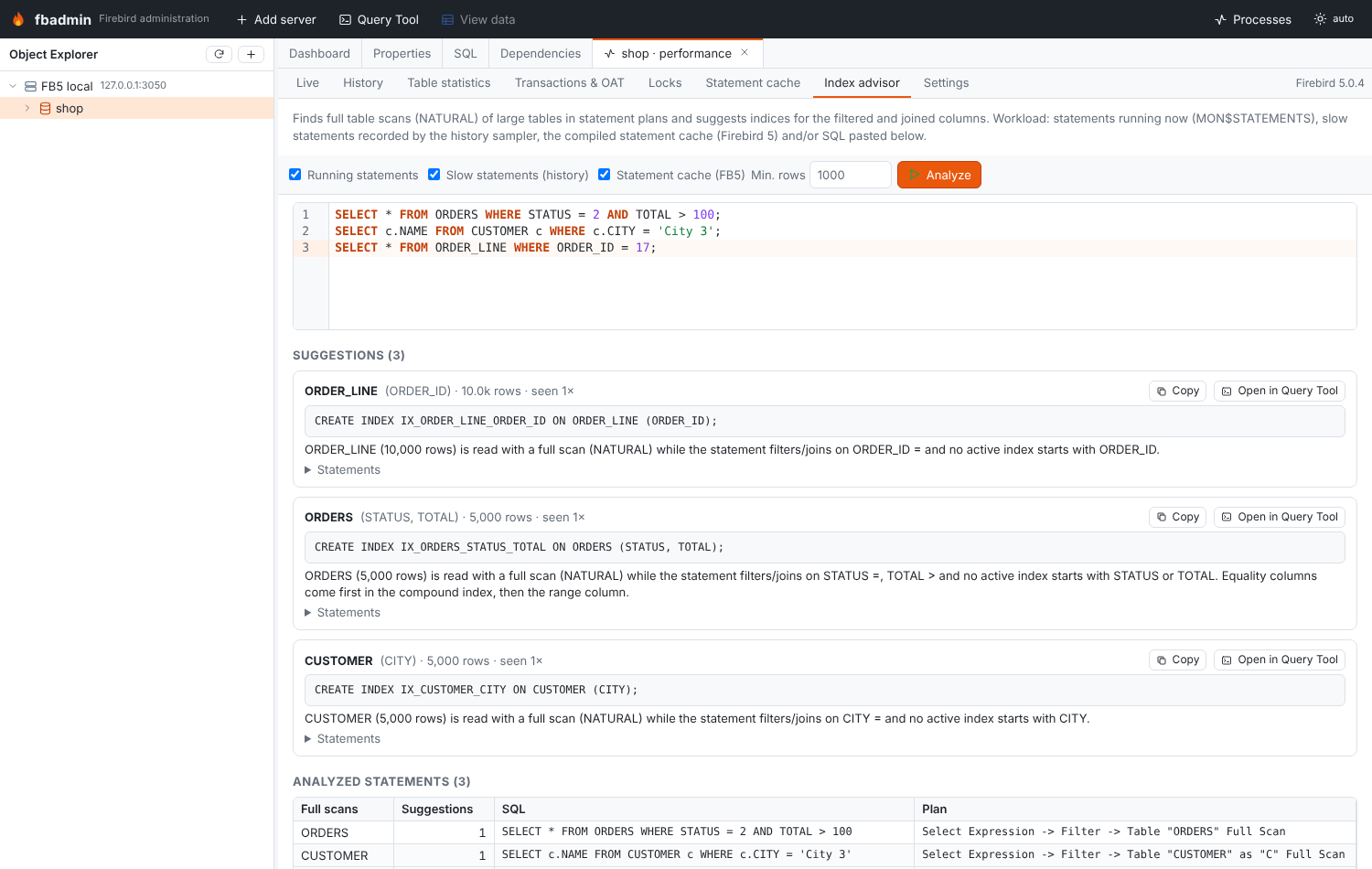
Workload sources (any combination): statements running now (MON$STATEMENTS with their explained
plan), slow statements recorded by the history sampler, the compiled statement cache (Firebird 5)
and SQL pasted in the editor (prepared to get its plan; nothing is executed).
For each statement:
- the plan is parsed for full scans:
Table "T" as "A" Full Scanin explained plans, orPLAN (A NATURAL)in legacy plans; - the SQL is parsed (regular expressions over the text with string literals blanked) for table
aliases and
WHERE/JOIN … ONpredicates: equality (=,IN,IS), range (<,>,BETWEEN,STARTING WITH,LIKE 'abc%'), function-wrapped (UPPER(col) = …) and non-sargable (<>,NOT …,CONTAINING,LIKE '%x'); - the scanned table's size is estimated with a bounded
COUNT(*)(capped at 1,000,000 rows); tables below min rows (default 1000) are skipped with a note; - if no active index starts with a filtered/joined column, a
CREATE INDEXis suggested: equality columns first, then one range column (at most three columns);UPPER/LOWER/TRIM(col)predicates get aCOMPUTED BYexpression index; - if an index exists but the table is still scanned, a note lists possible causes (stale
selectivity →
SET STATISTICS INDEX, type mismatch,OR, low selectivity).
Suggestions are ranked by total observed time, then occurrences and table size. Each has the DDL (copy / open in the Query Tool), the reasoning and the statements it came from. This is a heuristic: check the new plan after creating an index.
Prometheus exporter
Disabled by default. Enable with FBADMIN_METRICS=1 or in Settings. Then GET /metrics
returns the text exposition format (0.0.4) for every database with history enabled, or for every
registered database with /metrics?all=1. Set FBADMIN_METRICS_TOKEN to require
Authorization: Bearer <token>.
Metrics (labels server, host, database): fbadmin_database_up,
fbadmin_scrape_duration_seconds, gauges firebird_attachments, firebird_transactions,
firebird_statements_active, firebird_statements_stalled, firebird_oldest_transaction,
firebird_oldest_active, firebird_oldest_snapshot, firebird_memory_used_bytes,
firebird_memory_allocated_bytes, and counters firebird_next_transaction_total,
firebird_page_{reads,writes,fetches,marks}_total,
firebird_record_{seq_reads,idx_reads,inserts,updates,deletes,backouts,purges,expunges,waits,conflicts}_total.
scrape_configs:
  - job_name: firebird
    metrics_path: /metrics
    static_configs: [{ targets: ["fbadmin-host:5050"] }]
Note that the counters reset when the database is closed by its last attachment (Prometheus
handles counter resets in rate()).
API summary
All under /api/servers/{sid}/databases/{dbid}/monitoring unless noted.
| Method | Path | |
|---|---|---|
| GET | /features |
what this server supports |
| GET | /snapshot |
counters + gauges |
| GET | /tables?order_by=&limit=&include_system= |
table statistics |
| GET | /compiled?search=&limit= |
compiled statement cache |
| GET | /transactions?long_running=&gap_warn= |
gaps, OAT holders, alerts |
| GET | /locks |
lock waits, blockers, config |
| GET | /history?hours=&max_points= |
stored samples with rates |
| PUT | /history/tracking {enabled} |
opt a database in/out |
| POST | /history/sample |
sample now |
| DELETE | /history |
delete stored samples |
| GET | /history/slow |
slow statement log |
| GET/PUT | /api/monitoring/settings |
sampler/exporter settings |
| GET | /profiler |
availability, sessions, attachments |
| POST | /profiler/run {sql, description} |
profile statements |
| POST | /profiler/start / /profiler/finish {attachment_id} |
profile another attachment |
| GET/DELETE | /profiler/{id} |
report / delete a session (DELETE /profiler = all) |
| POST | /advisor {sources, sql, min_rows} |
index suggestions |
| GET | /metrics (root) |
Prometheus exporter |